Security Camera CZ
- 4.3
- Rating
- 1.00M
- Installs
- Free
- Price

 Analysis by App-foxy
I like the idea behind Security Camera CZ because it gives an older phone a second job instead of leaving it in a drawer. In my experience, that makes it more interesting than a typical home-monitoring download: the value depends not only on the app itself, but also on the spare phone, the camera position, the power supply, and the quality of the connection between the two devices.
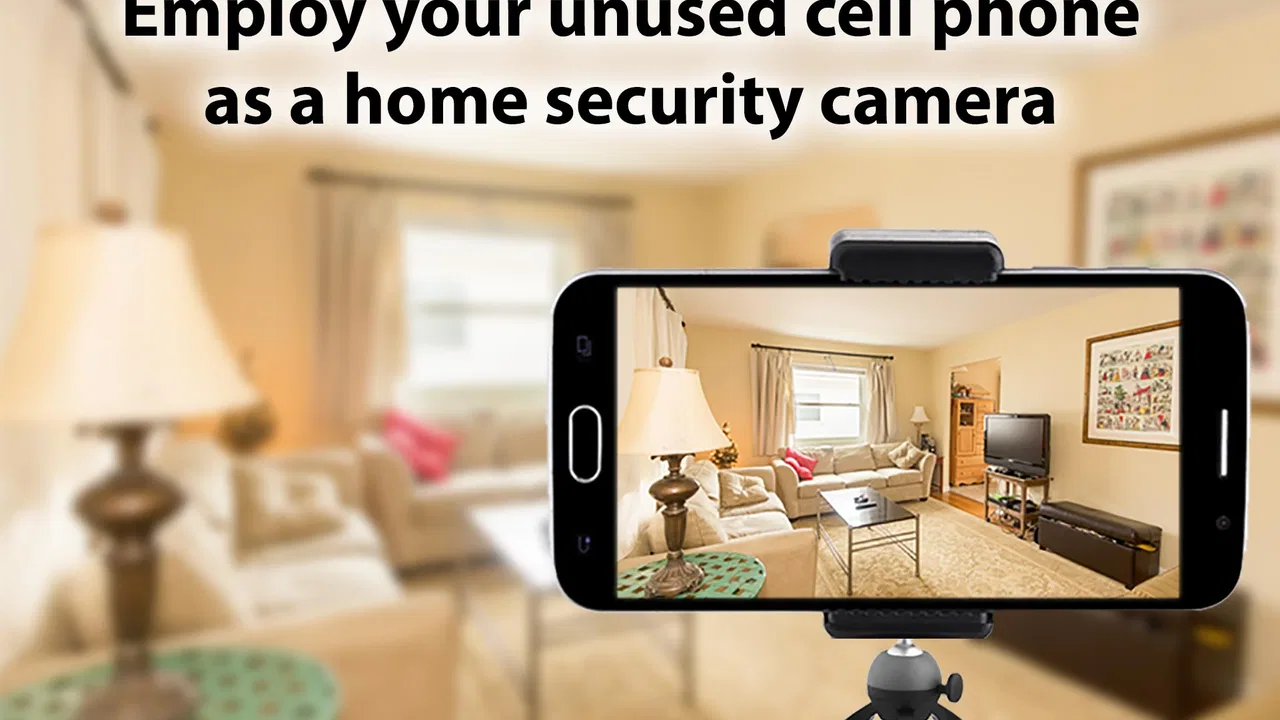
This is a free House & Home app from SCamera, aimed at turning an unused phone into a security camera, pet monitor, IP camera, or webcam. It has reached over a million installs and holds a 4.3 average from around seventeen thousand ratings, so it is clearly familiar to a substantial Android audience. The age rating is Everyone, which fits the straightforward household purpose, although responsible setup still matters when a camera points into a shared or private space.
I would recommend trying it when you need a temporary view of a room, a simple way to check on a pet, or a practical use for an old handset. I would not treat it as a replacement for a dedicated security system without first testing your network, charging arrangement, viewing phone, and recovery routine. That distinction is the key to understanding the app.
You May Also Like

 Blood Strike: 2.5 Anniversary
Blood Strike’s Loadouts Turn Every Drop Into a Tactical Gamble
A close look at Blood Strike’s custom loadouts: how fast access to signature weapons reshapes its battle royale rhythm, rewards preparation, and narrows the gap between fights.

 Pandora - Music & Podcasts
Pandora’s Music Is Easy to Start, but Harder to Recover
Pandora’s strength is its low-effort path from a seed to a station. Its weak spot is how much confidence it asks you to place in connection, setup, and quiet recovery.

 8 Ball Pool
 Is Built on Rivalries, Rematches, and Routine
A close look at the rivalries, rematches, shared routines, and unanswered safety questions that turn a quick pool match into a persistent mobile community.

 Samsung Music
’s Quiet Strength Is Playing What You Already Own
Its reach comes less from spectacle than from dependable access to a personal library. That simplicity is both the app’s strongest retention engine and its ceiling.

 AccuWeather: Weather Radar
AccuWeather Review: A Quick, Clear Forecast for Everyday Decisions
For everyday plans, the best forecast is the one you can understand quickly. AccuWeather makes rain timing, radar, and local conditions easy to act on, with a few trade-offs.

 Hill Climb Racing
Why Hill Climb Racing Still Turns Crashes Into One More Run
A tiny car, a bumpy hill and one more upgrade: Hill Climb Racing keeps resurfacing because its simple chaos makes every near-miss feel personal.
More From Our News Desk
View All News


How the connection shapes everyday use
I find that the connection is the part of this setup most worth testing before you build a routine around it. I’d check the camera phone from the exact place I plan to view it, then decide whether the handoff between devices feels dependable enough for the task. That small trial helps separate a useful everyday monitor from a setup that needs too much watching of its own.
The first setup is really a two-device project
The app works best when you think of it as a pair of roles rather than a single installation. One phone stays where you want to watch, while another device is used to view what the camera sees. That arrangement sounds simple, but it changes the practical questions. The old phone needs a stable position, continuous power for longer sessions, and a connection that does not disappear when the screen goes dark or the device becomes aggressive about saving battery.
I suggest starting with a short test in the exact place where you plan to use the camera. Do not test beside the router and assume the bedroom, hallway, garage, or front window will behave the same way. Put the spare phone in its final position, open the viewing side elsewhere, and walk around the home while checking whether the picture remains usable. This catches weak coverage before you depend on the app for a real situation.
The network is not just a technical detail here. It affects whether the app feels reassuring or frustrating. A live camera is useful only when the image arrives promptly enough to interpret. If the connection is unstable, you may spend more time wondering whether nothing is happening or whether the picture has simply stopped updating. That uncertainty is more serious than a slightly imperfect image.
Useful network moments, and the moments that expose its limits
For a quick pet check, connectivity can be enough. I can imagine leaving an older phone facing a dog’s bed, then checking from another room while preparing dinner. For that kind of short observation, a small delay may not matter. The goal is simply to see whether the pet is settled, awake, or standing near a restricted area.
The same setup becomes less comfortable when you need continuous confidence. A camera pointed at an entryway, a child’s sleeping area, or a room containing something valuable needs a dependable connection and a clear understanding of what the app is showing. If the image freezes, the last visible frame can look reassuring even though it is no longer current. I therefore treat the live view as a convenience monitor, not proof that every moment is being captured or reported.
Another practical issue is that the old phone may be doing more work than expected. A device that seems fine for occasional use can become warm or drain quickly when its camera and network connection remain active. I would place it where air can circulate, avoid covering it with fabric, and use a reliable power arrangement. Keeping the phone plugged in solves one problem but introduces another: cable placement must not pull the phone out of alignment or create a tripping hazard.
Mobile viewing is convenient, but not automatically private
The strongest part of this concept is mobility. The camera can stay in one room while I carry the viewing device to another part of the home. That is more flexible than standing beside a traditional monitor, and it makes the app useful for brief checks throughout the day. It also means the experience depends on the network available to the viewing phone, not only the connection near the old handset.
This matters when you leave the home. A camera that works perfectly on your home network may behave differently when you try to view it through a mobile connection or another Wi-Fi network. I would test that scenario before relying on it while away. Use a harmless test, such as pointing the camera at an empty room, and confirm that the viewing arrangement behaves as expected before treating it as a remote monitor.
There is also a human side to mobile access. A phone is easy to carry, but it is easy to misplace, silence, or hand to someone else. If you use the setup for a sensitive room, think about who can physically access the viewing device and whether notifications, previews, or open screens could reveal more than intended. The app’s Everyone rating describes its broad suitability, not a guarantee that every household arrangement is automatically safe.
What I do when the picture disappears
Connectivity failures are inevitable in a setup built from old hardware and a home network. My first recovery step would be to identify which side failed. If the viewing phone cannot connect, check whether the camera phone is still powered, whether its screen shows the app, and whether the device has moved off the network. If the camera phone is unresponsive, restarting the viewing phone will not solve the real problem.
I also recommend a simple physical check before changing settings. Look at the cable, confirm that the phone has not locked itself into a low-power state, and make sure the camera lens has not been covered or turned toward a wall. These are ordinary causes, but they are easy to overlook when the only symptom is a blank or outdated view.
For a temporary monitoring session, restarting the app on the camera phone may be a reasonable fix. For a setup intended to run regularly, I would create a routine: check the live image at the start of the day, confirm the phone is charging, and make a quick viewing test before leaving. This is not glamorous, but it is more dependable than discovering a failure only when you need the camera.
The recovery experience is also why I would avoid placing the spare phone somewhere difficult to reach. A high shelf may give a better angle, yet it makes every restart, cable adjustment, or lens cleaning inconvenient. A slightly less perfect angle at reachable height is often the better trade-off. The best camera position is one you can inspect without dismantling half the room.
Managing data without making the setup complicated
A live video connection can consume more network capacity than ordinary messaging or browsing, especially when the camera remains active for long periods. I would avoid placing the camera phone on a connection that other household members need for work, calls, or streaming until I have observed how the setup affects normal use. Start with short sessions and expand only if the network remains comfortable.
Data-conscious use is not only about bandwidth. It is also about where the phone points. A camera aimed at a doorway may capture visitors, delivery workers, or neighbors passing outside. A camera aimed at a pet’s sleeping area is usually less intrusive than one pointed across a shared living space. I prefer narrow framing: show the area that matters and avoid collecting a wider view simply because the phone can see it.
Before using the app in a shared home, tell the people who may appear in the camera’s view. That conversation is especially important if the old phone is placed in a bedroom, home office, or other private area. A temporary monitor should remain temporary in both location and purpose. If the need changes from checking a pet to watching an entrance, reposition the phone and reconsider who may be recorded.
Another useful habit is to remove the old phone from unrelated accounts and personal material before turning it into a camera. I would clear unnecessary photos, messages, and apps, then keep the device dedicated to the monitoring task as much as possible. That reduces distractions and makes troubleshooting easier. It also limits the amount of personal information sitting on a phone that may be left in a less secure location.
Where this app beats ordinary alternatives
Compared with buying a dedicated indoor camera, this approach can be cheaper and faster to try because the main camera hardware may already be in your home. It is particularly appealing if you need only a temporary view, are moving between rooms, or want to test whether monitoring is useful before spending more. The old phone also gives you flexibility in placement that may be convenient during travel or a short home project.
Compared with a standard webcam, the phone-based arrangement is more adaptable around the house. You are not tied to a computer desk, and the device can be positioned where a laptop would be awkward. That makes the webcam use case practical for a quick home-office experiment or a temporary view of a workspace.
Dedicated cameras still have important advantages. They are designed for continuous placement, usually have a more predictable mounting system, and may offer a more polished experience for alerts, recording, night viewing, or long-term remote access. I would choose one of those products when I need a dependable security installation rather than a repurposed-phone solution. Security Camera CZ is more convincing as a flexible monitor than as a complete alarm system.
There is a similar trade-off with ordinary video-call apps. Those apps are familiar for person-to-person communication, but they are not necessarily comfortable for leaving an old phone in a room as a dedicated camera. This app’s focused purpose makes the workflow clearer, even though the result still depends heavily on the devices and connection around it.
Small workflows that make it more useful
One of my favorite practical uses would be a short renovation or repair project. Place the old phone where it can see a doorway or a work area, then use the other device to check whether a delivery has arrived or whether a pet has entered a dusty room. Once the task is finished, unplug and store the phone. This is a sensible match for a repurposed device because the monitoring need has a clear beginning and end.
A second use is checking a pet during a predictable part of the day. Instead of leaving the camera running indefinitely, I would position it for a defined window, verify the view, and close the session afterward. That reduces unnecessary network use and limits how much household activity passes through the camera.
A third is using the phone as a temporary webcam when the built-in computer camera is inconvenient or unavailable. The phone may offer more freedom in positioning, but I would test the framing and connection before an important call. A phone balanced on furniture can shift, and a cable can pull it out of view. A small, stable stand is more valuable than a perfect angle that cannot survive ordinary movement.
For all three workflows, I would mark the camera phone with a visible note such as “camera active” when other people share the space. That is a simple trust-building step. It also prevents someone from moving the device without realizing that the view has changed or that the session is still running.
Version, cost, and the practical commitment
The app is free to install, which makes experimentation easy. Its current version is 3.11.0, and in-app purchases are listed at fourteen dollars and ninety-nine cents per item. I would begin with the free experience and only consider spending money after confirming that the old phone, network, and viewing routine actually suit my needs. The purchase price is not the only cost: a stand, charging cable, replacement battery, or stronger network position may matter just as much.
Free does not mean effortless. The setup asks you to provide working hardware and to take responsibility for placement, power, and connection. If your spare phone has a weak battery, an unreliable camera, or an outdated operating environment, the app cannot turn it into a dependable professional device. I see the low entry price as an invitation to test, not as evidence that every old handset will perform equally well.
SCamera has kept the app available since its release on April 25, 2018, and the current version shows that it remains maintained as a product people can still use. I would still install it on the actual spare phone before planning around it. Repurposed hardware varies widely, and a smooth experience on one device does not guarantee the same result on another.
Who should use it, and who should skip it
I think it is a good fit for renters, pet owners, students, and families who already have an unused phone and want a temporary indoor monitor. It is also useful for someone who wants to explore the idea of a home camera without immediately buying dedicated equipment. The app’s broad age rating and simple purpose make it approachable for ordinary household experiments.
I would skip it if you need a professionally installed security system, guaranteed coverage, or a monitoring arrangement that must continue without regular checks. I would also look elsewhere if your home network is unreliable, your spare phone cannot remain powered safely, or you need advanced security functions rather than a live view. In those cases, a purpose-built camera is likely to reduce the number of things that can go wrong.
My final view is positive but practical: the app’s real strength is turning an available phone into a flexible, low-cost monitor. Its weakness is that the entire experience inherits the limitations of that phone and the network around it. If you test the connection in place, keep the camera reachable, limit the field of view, and use it for the level of reliability it can realistically provide, Security Camera CZ is a worthwhile tool. I would recommend it to a friend for temporary home monitoring and webcam duties, while being clear that convenience is not the same as a complete security solution.
FAQs for Security Camera CZ
01What platforms is Security Camera CZ available on?
Security Camera CZ is available for both Android and iOS devices. Users can download it from the Google Play Store or the Apple App Store. It is designed to transform your smartphone into a surveillance camera, offering flexibility and security for both platforms.
02How does Security Camera CZ work for home surveillance?
Security Camera CZ utilizes your smartphone's camera to monitor and record activities in real-time. It features motion detection, alerts, and the ability to view live feeds. This makes it a convenient home surveillance solution without needing additional hardware, as long as you have an internet connection.
03Are there any subscription fees for Security Camera CZ?
Security Camera CZ offers both free and premium versions. The free version provides basic features, while the premium version unlocks additional functionalities like HD video recording and cloud storage. Users can choose based on their needs and budget, ensuring a flexible approach to security.
04Is Security Camera CZ user-friendly for beginners?
Yes, Security Camera CZ is designed with an intuitive interface that is easy to navigate, even for beginners. It offers step-by-step instructions for setup and configuration, ensuring users can quickly get started with their home surveillance without needing technical expertise.
05What are the privacy features of Security Camera CZ?
Security Camera CZ prioritizes user privacy by offering encrypted video streams and secure data storage options. Users can control who has access to their video feeds and recordings, ensuring their surveillance system remains private and secure, aligning with modern privacy standards.
Pros
- Easy setup with user-friendly interface.
- Supports both Android and iOS devices.
- Motion detection alerts are reliable.
- High-quality video streaming available.
- Remote access from any location.
Cons
- Requires a stable internet connection.
- Some features are behind a paywall.
- Battery usage can be high on mobile.
- Occasional lag with live streaming.
- Limited free cloud storage options.

Security Camera CZ
Gallery